Full Stack Engineering for Product Managers
A No-BS Technical Guide to Frontend, Backend, AI, and Everything in Between

👋 Hi everyone, I am Hamza. I have 18+ years of experience building large-scale machine learning ecosystems, teach at UCLA and MAVEN, and am the founder of Traversaal.ai.
Welcome to Edition #38 of a newsletter that 16,000+ people around the world actually look forward to reading.
🎁 Take the 5-minute sample Claude Code Architect exam to test your Claude Code skills.
🎁 Free course on Claude Code
🎓 Looking to deepen your knowledge as a developer and pass the Claude Code Certification? Here’s your opportunity!
Join us on July 23rd for a three-week immersive Claude Code Course and ability to take the certification through our partner network.
We’re living through a strange moment: the internet is drowning in polished AI noise that says nothing. This isn’t that. You’ll find raw, honest, human insight here, the kind that challenges how you think, not just what you know. Thanks for being part of a community that still values depth over volume.
If you’ve ever nodded along in an architecture review while having absolutely no idea what just happened, this guide is the one you should have read first.
Introduction: The PM who accidentally made an infrastructure decision
Here’s a scenario that played out at a dozen Series B AI startups in the past year. A product manager uses Claude Code to prototype a customer-facing document summarization feature over a weekend. The demo is clean, the output looks sharp, and by Monday morning it’s sitting in a staging branch.
By Wednesday, the engineering lead is asking uncomfortable questions:
Q. How does it handle PII in uploaded documents?
Q. What happens when the document exceeds the context window?
Q. Why is there no retry logic for when the model API times out?
The PM doesn’t have answers, not because they were careless, but because they didn’t know those were questions they were supposed to ask.
This is the structural reality of full stack for product managers in 2026.
The tools have changed faster than the mental models. Claude Code, OpenAI Codex CLI, and agentic harnesses like LangGraph have collapsed the time it takes to go from idea to running code, but they haven’t collapsed the complexity underneath it. Someone still has to own the architectural choices. Right now, PMs are making those choices without realizing it, one AI-generated file at a time.
The numbers back this up. AI-native teams are shipping three to five times faster than traditional engineering teams, according to the 2025 State of DevEx report from DX (Source: https://getdx.com/research/state-of-devex-2025). But velocity without architectural literacy is how you accumulate technical debt that paralyzes the team six months later. The code ships fast. The consequences arrive slowly.
This guide won’t turn you into an engineer. What it does is give you the mental models to understand what your engineers are actually arguing about, so you can make better decisions, ask smarter questions, and catch the moment when the AI-generated code is quietly creating a problem you’ll own in Q3.
🔑 Key Takeaways
🖥️ Frontend is the contract layer: Every UI decision your team makes creates a promise to users that the backend then has to keep, so PMs who understand the gap between the two ship fewer broken features.
⚙️ APIs are your product’s nervous system: When engineers argue about API design, they’re really arguing about how hard it will be to change your product later, which makes that conversation your business.
🤖 AI backend is not regular backend: LLM-powered features have a completely different failure mode than traditional software, where outputs drift invisibly over time instead of throwing an obvious error.
🗄️ Your data model is a product decision: Choosing how data is structured and stored shapes what you can build next, meaning a database schema choice made in week one can box you in for years.
🚀 “Production” means real consequences: Shipping to production isn’t flipping a switch; it’s exposing real users to real risk, and understanding environments, rollbacks, and where your code actually runs is how you manage that risk without freezing your team.
📡 Observability is now a PM responsibility: If you’re shipping AI features without logging what the model actually does in the wild, you have no way to know when quality silently degrades on your users.
1. The full stack mental model: what it actually is and why the layers matter
1.1 Why “full stack” is a systems metaphor, not just a job title
When engineers say “full stack,” they mean a complete software system, everything from the pixel a user taps on their phone to the database row being written on a server somewhere. For PMs, the value of this metaphor isn’t technical precision; it’s situational awareness. Every product decision you make touches at least one layer of that stack, and understanding which layer tells you how expensive, how risky, and how reversible that decision is.
Think of it as an iceberg. Users see roughly ten percent of the system, the interface, the interactions, the words on the screen. That visible surface depends entirely on the ninety percent they never see: the servers processing their requests, the databases storing their data, the authentication systems validating their identity, and increasingly, the AI pipelines generating their content. When a PM makes a UI decision, they’re also making assumptions about the entire iceberg beneath it. The mental model of the full stack is what lets you hold those assumptions consciously, rather than accidentally.
Technical literacy for product managers has become urgent in 2026 not because PMs suddenly need to write code, but because PMs are now generating code through AI tools and deploying it into systems where the iceberg is large, and largely invisible.
1.2 The three major layers: a PM-readable map
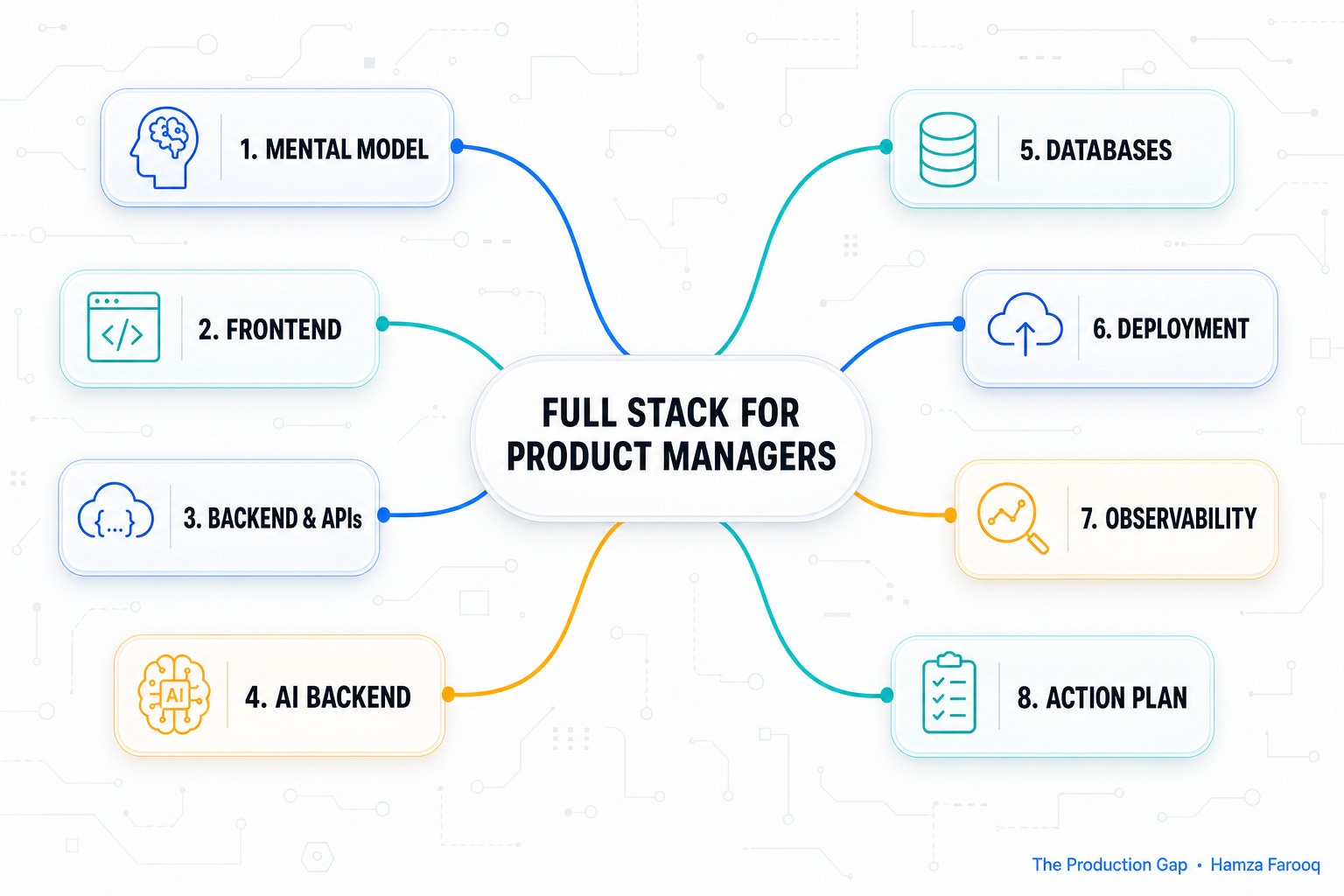
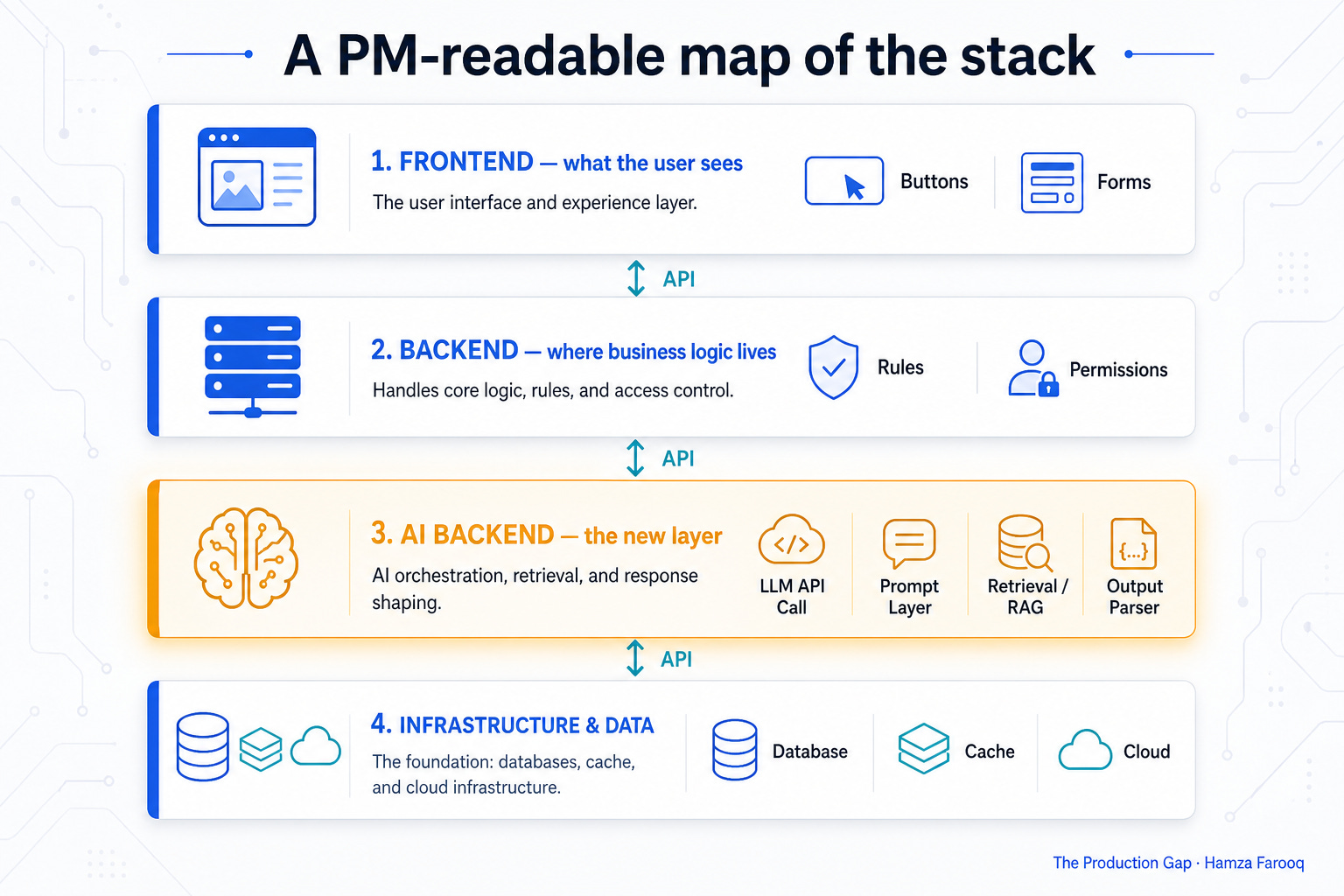
The stack breaks into three practical layers that every PM should be able to navigate without jargon.
Frontend is everything the user directly interacts with, the visual interface, the buttons, the forms, the animations. It runs in the browser or native app on the user’s device. When a user clicks “Generate Report,” the frontend registers that click and makes it look like something is happening.
Backend is where the actual work gets done. Business logic lives here: the rules that decide whether a user has permission to generate that report, the code that fetches the right data, the service that formats the output. The backend runs on a server, not on the user’s device, which is why it can be trusted with sensitive operations.
Infrastructure and data layer is everything that makes the backend possible, the databases that store data persistently, the cloud services that run the servers, the networking that moves data between components, the caches that make retrieval fast.
AI backend is now a fourth emergent layer that sits between backend and infrastructure in agentic systems. It includes the LLM API calls, the prompt engineering layer, the retrieval systems, and the output parsers. We’ll go deep on this in Section 4 because it has a completely different failure profile than the other three layers.
These layers communicate through APIs, which is why API design is so central to every product conversation that feels like it’s “just engineering.”
Illustration: The Production Gap
1.3 Why the boundaries between layers are where product bugs live
Here’s something no introductory tech guide tells PMs: most production bugs don’t live inside a single layer. They live in the contracts between layers, the assumptions each layer makes about what the other will deliver.
A frontend that assumes data will always arrive in a specific format breaks the moment the backend changes its response structure. A backend that returns an HTTP 200 OK status even when it hit an internal error breaks the frontend’s ability to handle failures gracefully. An AI layer that silently returns an empty string instead of throwing a catchable error breaks the entire user experience with no visible alarm. None of these failures is catastrophic inside a single layer, but all of them are catastrophic at the boundary.
PMs who understand these boundaries write better acceptance criteria and catch more problems during spec review, before the bug is ever coded. When your spec says “show the user their report” and doesn’t describe what happens when the backend is slow, the AI returns nothing, or the data is malformed, that’s not an incomplete engineering decision. That’s an incomplete product decision.
2. Frontend explained: what PMs actually need to know
2.1 What frontend is (and what it isn’t)
Frontend is everything that runs in the user’s browser or native application. In a web context, that means three things working together: HTML provides the structure and content (the bones), CSS provides the visual styling (the skin), and JavaScript provides the behavior (the muscles). When a user sees a dashboard, clicks a button, watches a spinner appear, or reads generated text streaming in word by word, all of that is frontend.
The most important distinction for PMs is between static frontend and dynamic frontend.
Static frontend is content that doesn’t change based on who’s looking at it, a marketing landing page, a documentation site, a pricing page. It can be pre-built and served from a global cache, which makes it fast and inexpensive.
Dynamic frontend is content that’s fetched and assembled based on who the user is and what they’re doing, a personalized dashboard, a feed, an AI-generated response. Dynamic pages are powerful but introduce latency, authentication complexity, and a hard dependency on the backend being available and responsive.
This distinction comes up in roadmap decisions constantly. When you’re deciding whether to build a feature into the main application or as a standalone marketing page, you’re making a static-versus-dynamic call with real cost and performance implications.
2.2 Frameworks, rendering, and why your engineering team’s choice affects your roadmap
As of mid-2026, the dominant frontend frameworks are React, Next.js (built on React with additional server-side capabilities), and Vue. You don’t need to know how to write code in any of them. What matters is why the choice affects your product.
Framework choice affects three things PMs care about directly: how fast your team can ship new UI features, how SEO-friendly your product is out of the box, and the size of the engineering talent pool you can hire from.
React remains the most widely adopted, with Next.js capturing the majority of new production projects in 2025–2026 due to its flexibility between rendering modes (Source: https://survey.stackoverflow.co/2025/).
The rendering mode decision is worth understanding.
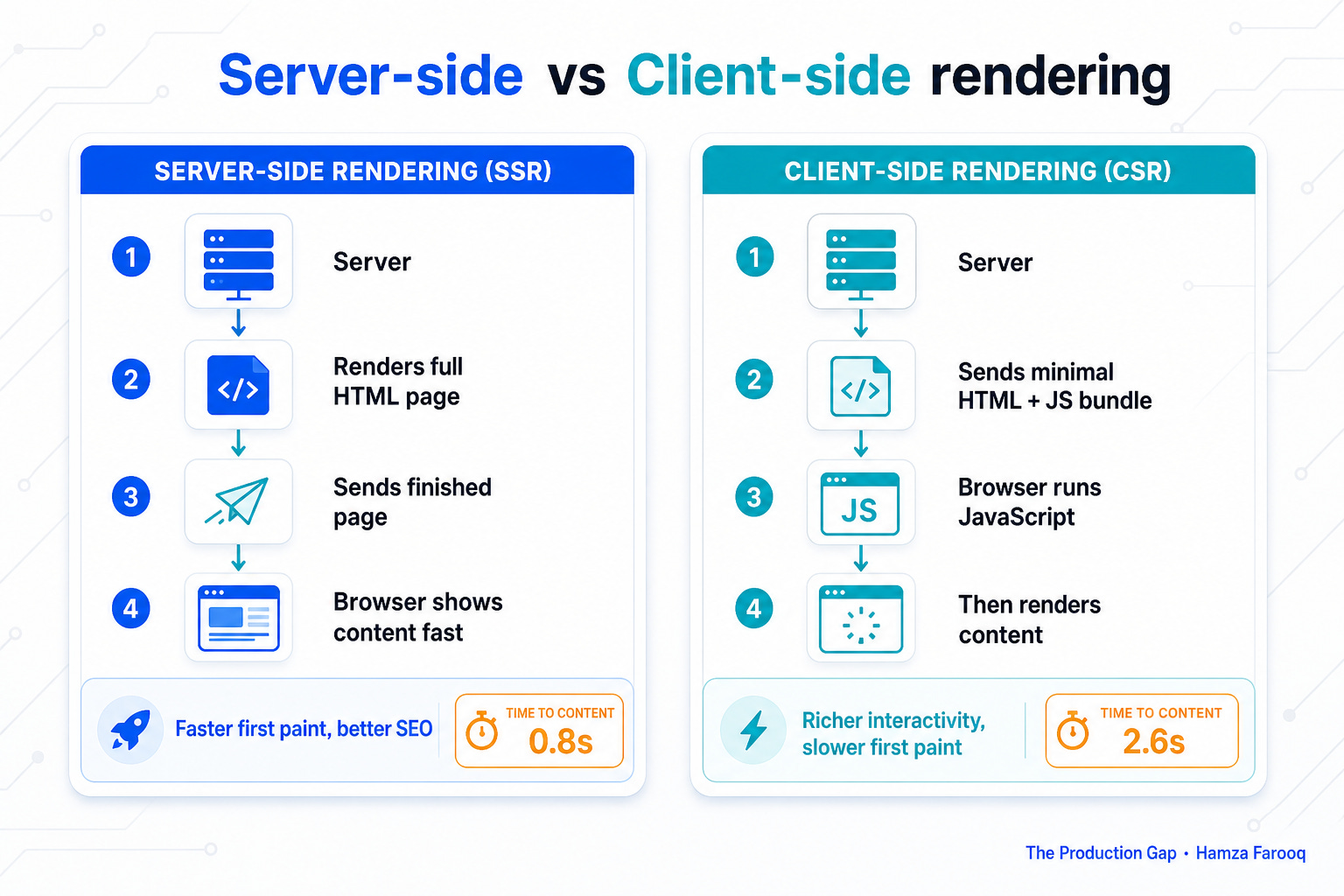
Server-side rendering (SSR) means the server assembles the complete HTML page before sending it to the browser, like a restaurant that plates your food in the kitchen before it reaches your table.
Client-side rendering (CSR) means the browser receives a minimal HTML shell and a bundle of JavaScript, then assembles the page itself, like a meal kit delivered to your table that you put together.
SSR is generally faster for first load and better for SEO; CSR can be more interactive once loaded. Many modern frameworks, including Next.js, let you mix both. When your engineers argue about which to use for a new feature, they’re making decisions about SEO performance, initial load time, and engineering complexity, all of which affect your product metrics.
Illustration: The Production Gap