
Day 7: Fully Functional Agent Loop
Build a Fully Functional ReAct Travel Agent Using n8n


Welcome to Day 7 of the Agents in Action Series.
Hi again!
It’s Hamza and Jaya, and you’ve officially made it to the final day of our 7-part journey into the world of intelligent agents.
If you’ve followed along since Day 1, you now understand how agents think, plan, retrieve, and interact. Here’s a quick recap of what we've covered:
Day 1: Agents are here and they are staying
We explored the rise of agents from basic GenAI capabilities to autonomous systems. Why just prompt a model when you can give it goals?
We dug into planning and reasoning: how agents break tasks into subtasks, choose actions, and reason step-by-step.
Day 3: Memory - the agent's brain
We covered short-term and long-term memory, vector stores, and how agents remember and reflect across tasks.
We explored Retrieval-Augmented Generation (RAG) for agents to access real-time knowledge through document and database search.
We saw how agents can go beyond text — interpreting images, audio, PDFs, and more.
Day 6: Scaling agents with ADK, A2A, and MCP
We explored how Google’s ADK, A2A protocol, and MCP create scalable agentic infrastructure. From single-agent demos to real-world deployable systems.
For this finale, we’re going from theory to reality: building a working travel agent using only the concepts and tools we covered over the past week.
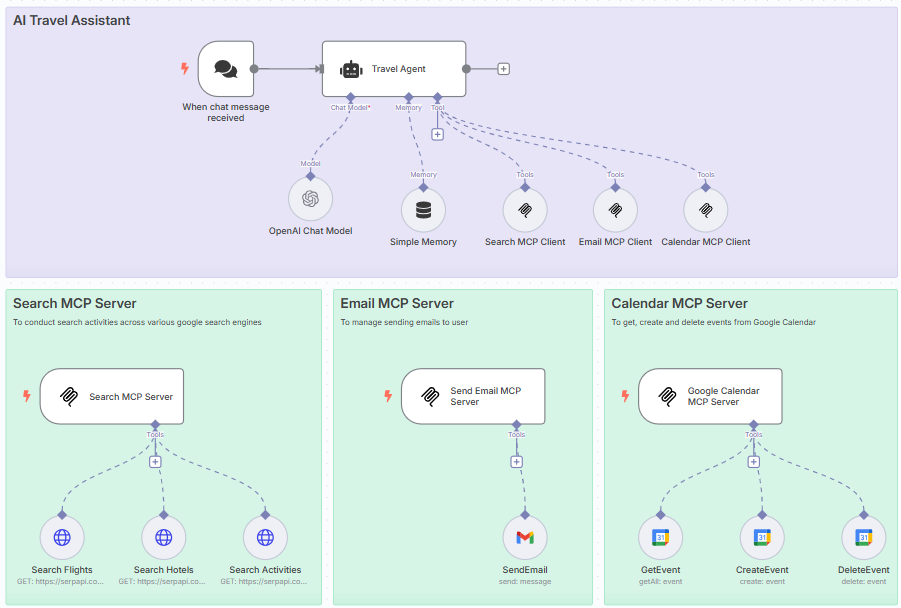
This workflow was built using n8n, a no-code/low-code automation tool that allows you to visually connect agents, tools, and APIs.
Here’s how it works:
The agent receives a natural language input from the user (e.g., planning a trip)
It uses reasoning steps to identify missing information or clarify ambiguous ones
Then, it plans which tools to use and in what sequence (e.g., flight search → hotel search → itinerary planning)
It accesses those tools using structured queries (inspired by MCP principles)
Finally, it assembles a summary and sends it to the user via email and adds the trip to their calendar
Step-by-Step: Travel Agent Workflow
We’ll break down the entire workflow node-by-node.
Step 1: User Input Trigger
The flow begins with a user request (triggered via webhook or form).
Text input example: “Plan a 5-day trip to Paris next month”
The message is passed into the system via n8n's chat trigger
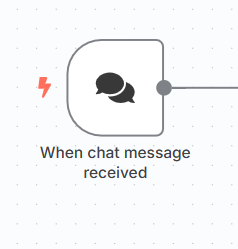
User input node
Step 2: Setup the Agent to parse user data
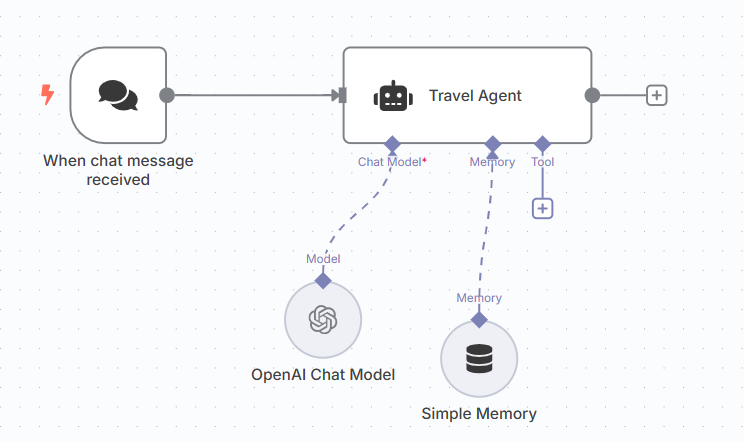
This is where we set up our ****AI agent inside n8n.
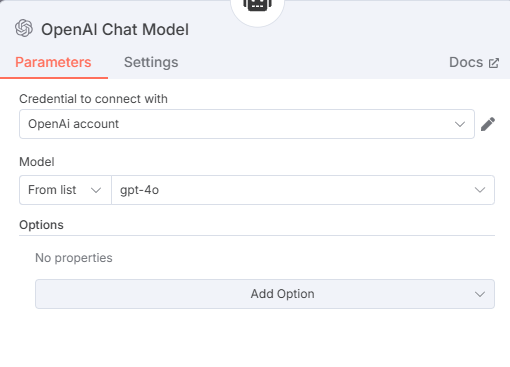
The user input is passed into an LLM node powered by the OpenAI API (you can use models like gpt-3.5-turbo or gpt-4). We also attach a simple memory block to help the agent retain short-term context across the workflow.
The system prompt includes structured instructions that guide the agent to:
Extract structured fields like destination, travel dates, and duration
Reformat the data into a format suitable for downstream tools
This step is focused purely on interpretation and memory retention — not yet tool interaction. It's a clean example of how to go from messy natural input to structured, actionable intent using LLMs and memory.
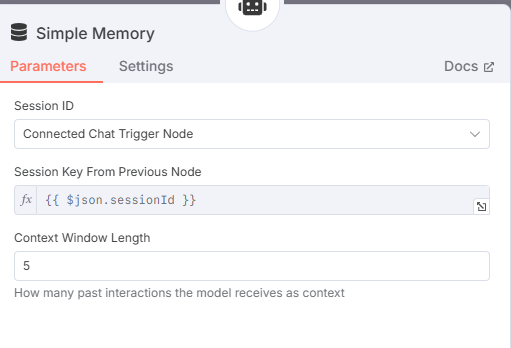
Step 3: Search MCP Server & Client setup
This is where the agent begins executing search tasks using the Search MCP, which includes three tools:
Search Flights
Search Hotels
Search Activities
These tools use SerpAPI under the hood to access Google search results and return structured data based on parameters passed from the agent.
The flow:
Agent sends search request to the MCP Server
Server routes to the correct tool (flights, hotels, or activities)
Results are returned to the agent via the MCP Client
This design decouples tool logic from the agent, allowing flexible, standardized integration.
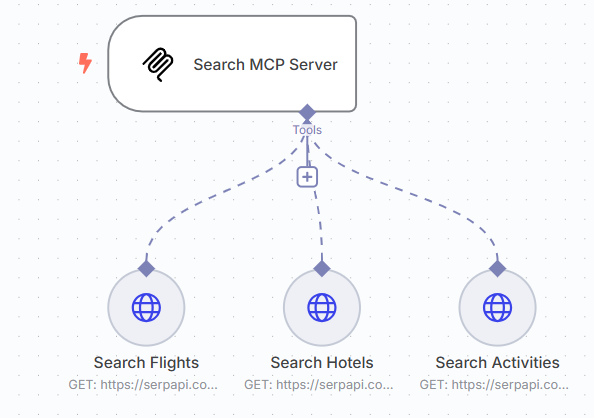
Search MCP Server and it’s tools
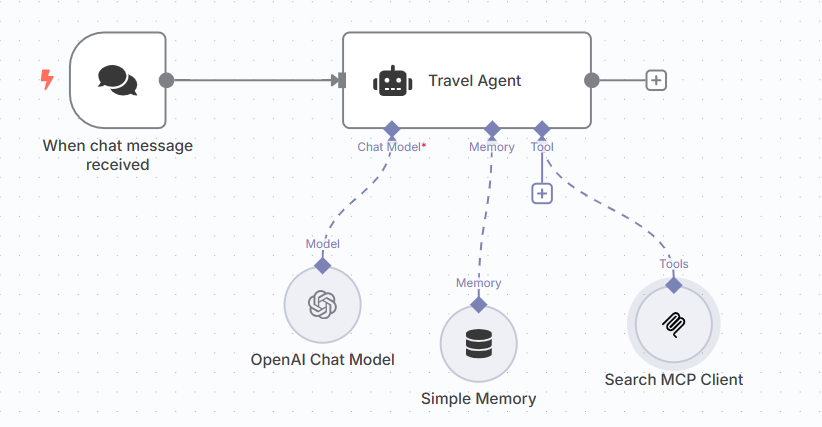
Search MCP Client to connect to Search MCP Server
In order to connect an MCP Server to an MCP Client, use the SSE endpoint in Server and add it to the MCP Client node.
Step 4: Email MCP Server & Client setup
Next, we use the Email MCP, which includes a single tool:
SendEmail
The user’s email address is collected in the earlier interaction. This tool takes the finalized travel plan and sends it directly to the user’s inbox as a neatly formatted message.
The MCP server accepts structured trip data, formats it, and handles the outbound email through a provider (like SendGrid or Gmail API).
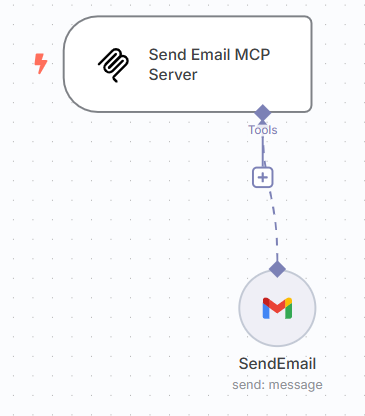
Email MCP Server
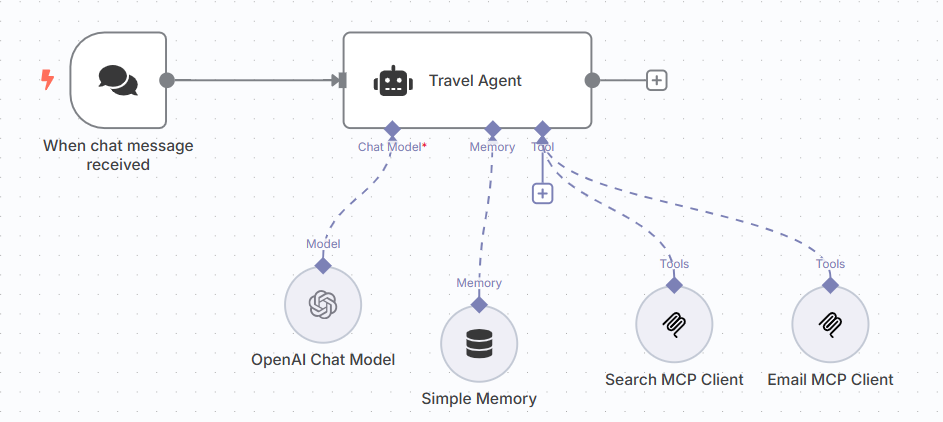
Email MCP Client, added to the agent
Step 5: Calendar MCP Server & Client setup
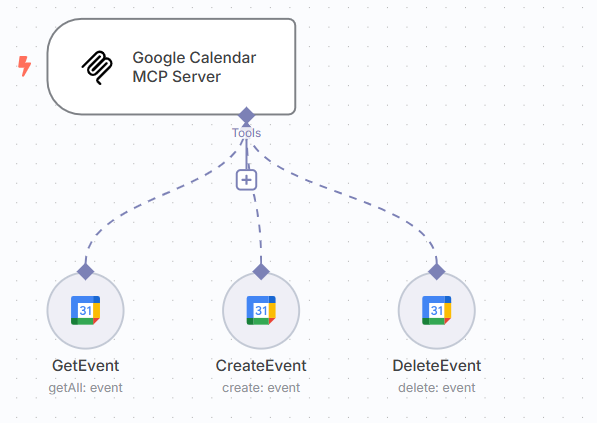
The Calendar MCP allows the agent to manage user calendar events with three tools:
GetEvent
CreateEvent
DeleteEvent
Here’s what it does:
Checks for conflicts during the travel dates
Adds trip events (flights, check-ins, tours) once finalized
Deletes/replaces events if the user changes travel plans
This makes the agent not just an advisor but an active participant in the user’s schedule.
Step 6: Final Output
Now comes the moment where everything comes together.
I told the agent I wanted to take a trip from Karachi to Paris. I provided it the dates and some activities I would prefer to do while in Paris.
The agent collects the flight options, hotel recommendations, and planned itinerary. It not only stitches the information into a cohesive summary but also packages it in a way that feels polished and ready to use.
The travel plan is sent via email to the me — giving a clean, organized view of their trip including flights, hotels, and activities. It can also be routed to chat platforms or webhooks for further integration.
Why This Matters
This travel agent isn't a toy — it's a deployable, modular, and extensible system. You can:
Swap in real APIs
Add more search tools (visa requirements, currency conversion, weather)
Extend output formats (PDFs, rich chat cards)
It’s a perfect example of tool-augmented agentic reasoning that doesn’t require full-stack development.
🎉 That’s a Wrap!
Over the past seven days, we’ve gone from foundational theory to a fully functioning system, not just imagining what agents could do, but actually building one that reasons, retrieves, and takes action. Along the way, you’ve seen the building blocks of modern intelligence: memory, planning, tools, collaboration, and real-world execution. But this isn’t just about travel agents or workflows — it’s about unlocking a new way of thinking.
What happens when intelligence becomes modular?
When reasoning becomes a service?
The future of AI isn’t just smarter models — it’s systems that work together, adapt, and solve. You now know how to build them.
Want to build your next big idea?
Check out my AI Agents for Enterprise course on Maven and be a part of something bigger and join hundreds of builders to develop enterprise level agents.
And just because you followed through: Use MAVEN20 to get 20% off
You're receiving this email because you're part of mailing list , and you've attended, registered for, or were invited (by a co-host, perhaps) to our events on MAVEN or other forms. These emails are the only way to reliably receive updates from us. We don't spam or sell your information. If you prefer not to receive our messages, simply "unsubscribe" below and we'll respect your desires. We endeavor to keep our list clean and only message people who want to hear from us. (Please do not mark messages as spam, as this makes it harder for those who want updates to receive them. Thanks!)
 | A guest post by
|
I finished the course, and it is one one great course for beginners to learn about agentic AI, thank you for creating for such a wonderful course 🙏.
I'm blown away by this travel agent work flow. Thank you for breaking down each step and connecting the dots between differrent tools and APIS. can you share more about how this work flow can be adpated for other domains. Lik similar agent for booking event tickets or finding job openings?