
Claude Code: Skills, Subagents, Hooks, Plugins, and Harnesses for Production Multi-Agent Workflows
A deep dive into all the fun topics of Claude Code


👋 Hi everyone, I am Hamza. I have 18 years of experience in building large scale Machine Learning ecosystems and I teach at UCLA and MAVEN, and founder of Traversaal.ai.
Today, I am joined by Aishwarya, a product builder obsessed with turning ideas into working tools, especially with AI in the mix.
Welcome to Edition #34 of a newsletter that 15,000+ people around the world actually look forward to reading.
We’re living through a strange moment: the internet is drowning in polished AI noise that says nothing. This isn’t that. You’ll find raw, honest, human insight here — the kind that challenges how you think, not just what you know. Thanks for being part of a community that still values depth over volume.
🎓 Want to learn about Claude Code?
Join us on May 8th, for a one-day workshop on Claude Code and ship your first agent!
Two engineering teams. Same Claude Code. Completely different outcomes. The gap isn’t the model — it’s knowing which primitive to reach for.
Claude Code Agents Explained: Skills, Subagents, Hooks, Plugins, and Harnesses for Production Multi-Agent Workflows
Introduction
Most developers hit a wall somewhere around their third or fourth Claude Code workflow. Individual agents work. The problem is getting them to work together — without context blowout, unpredictable ordering, or a debugging session that consumes the entire sprint.
The root cause is almost always the same: practitioners are using the right tools in the wrong layer. A behavioral constraint that should be a hook gets written into a system prompt. A reusable workflow that should be a skill gets copied and pasted into every conversation. A task that belongs in a subagent ends up in the main session and fills the context window with logs nobody will reference again.
Claude Code gives you six distinct primitives:
CLAUDE.md (persistent context),
skills,
plugins,
subagents,
hooks, and
the harness.
Each has a specific job. Mixing them up doesn’t just make code harder to maintain — it produces agent systems that behave inconsistently, cost more than they should, and fail in ways that are hard to reproduce.
This article maps the full stack. You’ll get the isolation spectrum mental model first (the single clearest way to understand when to use what), then a deep dive on each primitive, starting with skills — the one most teams discover last despite needing it first.
🔑 Key Takeaways
🧩 Skills are the missing primitive most teams overlook. They run inside your current context window, load only when needed, and replace the pattern of pasting the same instructions into every conversation.
🪝 Hooks give you deterministic control points. Unlike CLAUDE.md instructions, hooks enforce behavior architecturally — a hook that blocks a tool call cannot be reasoned around.
🔌 The plugin/subagent confusion kills otherwise good architectures. Plugins extend what Claude can touch; subagents extend how Claude reasons. Getting this backwards produces designs that collapse at scale.
🏗️ Subagents protect your main context window. They do isolated work and return a summary — the exploration noise never lands in your primary session.
🤝 Agent teams are experimental and fundamentally different from subagents. They run in separate processes, communicate directly with each other, and coordinate via a shared task list. Subagents can’t do any of that.
☁️ The harness is where institutional knowledge lives. Every team convention that currently exists in a senior engineer’s head can be encoded as enforced logic in a harness — and that’s the whole point.
1. The isolation spectrum: the mental model that cuts through the confusion
Before diving into individual primitives, there’s one diagram worth committing to memory:
Skills ──────────── Subagents ──────────── Agent Teams
(Same Context)    (Isolated Context)    (Separate Process)
  Low cost              ↕                  High isolation
  Fast                  ↕                  Parallelism
This spectrum describes the fundamental trade-off in every Claude Code design decision. The further right you go, the more isolation and parallelism you get — and the more overhead you pay. The further left, the cheaper and faster, but everything shares context.
Skills sit at the left end. They load into your current conversation and stay there. Claude sees the instructions alongside everything else in the session.
Subagents sit in the middle. They run in their own context window, do their work, and return a summary to the main agent. What happened inside the subagent doesn’t pollute your main session.
Agent teams sit at the right end. Each teammate is a separate Claude Code process. They share a task list and can message each other directly — not just report back to the main agent. As of this writing, agent teams are experimental and require an environment variable to enable.
The full hierarchy looks like this:
Harness              ← the runtime (you build one or live inside Claude Code's)
  └── Main Agent     ← runs inside the harness
        ├── Skills   ← in-context instructions, same window
        ├── Subagents ← isolated workers, one-way comms back
        └── Agent Teams ← separate processes, bidirectional
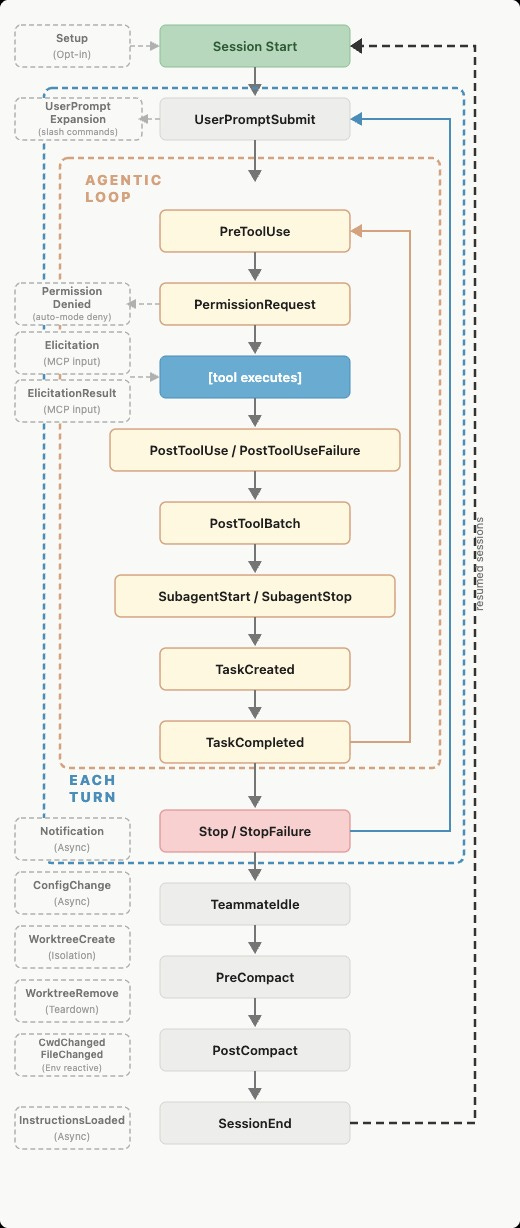
Plugins and hooks apply across all levels. Plugins extend what any agent can touch — the tool surface. Hooks fire at lifecycle events and give you deterministic control points regardless of which layer you’re in.
1.1 Why the agent-as-the-unit framing fails
Most developers start by thinking about “the agent” as the atomic design unit — the thing you configure, the thing that fails, the thing you debug. That framing collapses all the interesting architectural decisions into one blob.
In practice, an agent is a Claude model instance with tools, a context window, and the ability to take multi-step actions. That definition says nothing about how the agent coordinates with others, how its actions are constrained, or how it fails gracefully when context fills up halfway through a task. Those decisions live in the layers around the agent — the primitives.
Treating agent-as-the-unit leads to monolithic agents holding 180k-token contexts with the entire repository history, every tool in the stack, and an open-ended system prompt trying to anticipate every subtask. They blow context unpredictably, produce inconsistent behavior across runs, and are nearly impossible to debug. The right structure is smaller, scoped primitives doing one job each.
1.2 The Declarative Extension Model
From Vikash Rungta’s architectural breakdowns of Claude Code, there’s a clean table that maps each primitive to its format and scope:
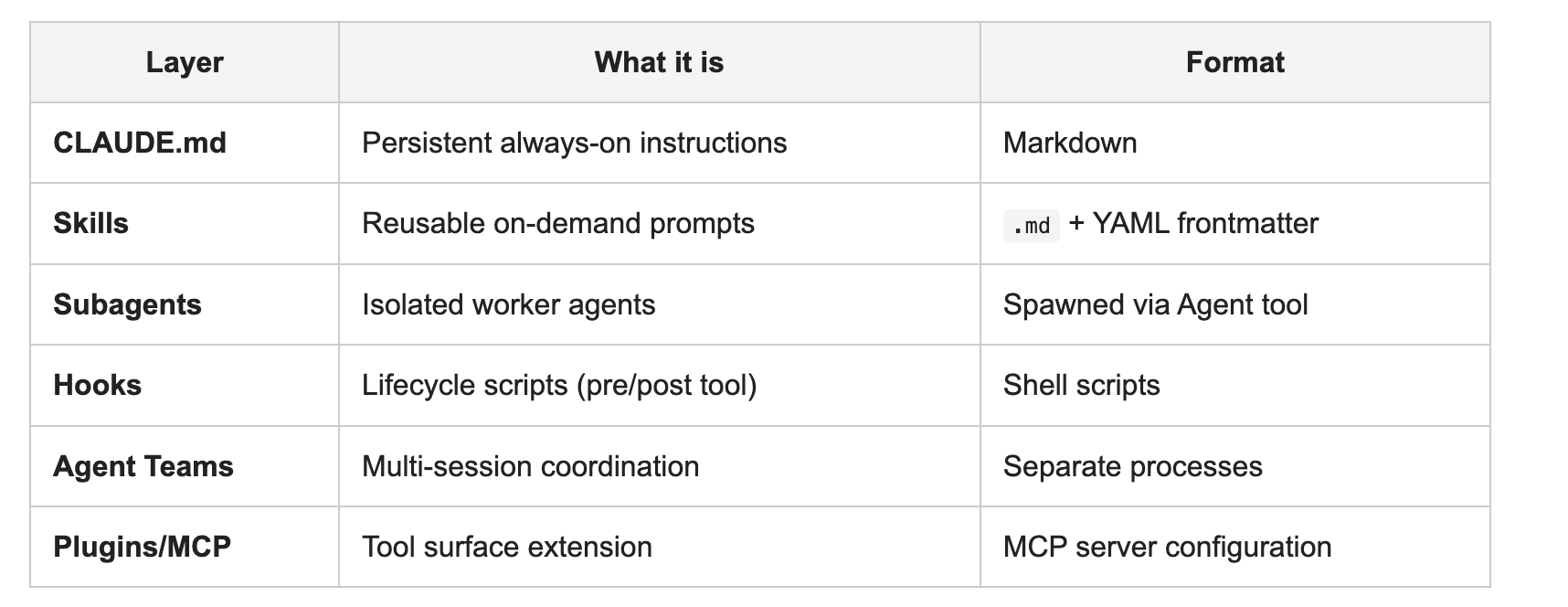
Each row has a distinct responsibility boundary. Confusing them — running routing logic inside a subagent’s system prompt instead of in a harness hook, using CLAUDE.md for enforcement instead of hooks — is the root cause of most “my agent setup is a mess” situations.
2. Skills: the primitive most teams discover last
Skills are the first thing most practitioners should reach for, but typically discover after they’ve already built messier workarounds.
A skill is a SKILL.md file stored in .claude/skills/<name>/, invoked either directly with /skill-name or automatically when Claude judges it relevant. The key property: it runs in the same context window as the current conversation. No isolation, no spawning, no new process — just additional instructions that become part of the session.
2.1 What skills are for
Create a skill when you notice yourself pasting the same instructions into every new conversation. If you have a section of CLAUDE.md that has grown into a multi-step procedure rather than a standing fact, that procedure belongs in a skill. CLAUDE.md content loads on every session; skill content loads only when invoked.
Per the official docs: “A file at .claude/commands/deploy.md and a skill at .claude/skills/deploy/SKILL.md both create /deploy and work the same way. Your existing .claude/commands/ files keep working.” Skills are the evolved form of custom commands, with additional features: YAML frontmatter, supporting files, dynamic context injection, and the ability to fork into a subagent when isolation is needed.
Frontmatter controls key behaviors:
---
name: deploy
description: Deploy the application to production
disable-model-invocation: true   # only you can trigger this
allowed-tools: Bash(git add *) Bash(git commit *)
---
disable-model-invocation: true is the most important field to understand. Without it, Claude can invoke the skill automatically when it judges the situation relevant — fine for reference content, wrong for anything with side effects like deployments or sends.
2.2 Dynamic context injection
One feature of skills that has no equivalent elsewhere: the !command`` syntax runs a shell command before the skill content reaches Claude, injecting the output inline.
## Current diff

!`git diff HEAD`

## Instructions

Summarize the changes above and flag anything risky.
When this skill runs, git diff HEAD executes first, and its output replaces the placeholder. Claude receives the actual diff, not a reference to one. This keeps the skill grounded in the current state of the repository rather than relying on Claude’s inference from open files.
2.3 Skills vs. CLAUDE.md vs. subagents
The three are frequently confused. Here’s the distinction:
CLAUDE.md: facts and standing rules that apply to every session in this project. Not procedures, not playbooks — context.
Skills: procedures that run in-context, on demand. Loaded when invoked, not before.
Subagents: isolated workers that protect the main session from their output. Use when the task’s intermediate steps (logs, search results, file reads) don’t need to stay in the main context.
The wrong choice here has a predictable failure mode: CLAUDE.md that keeps growing into a procedures document bloats every session. Ad-hoc instructions pasted into chat can’t be reused. Subagents spawned for tasks that should be skills add unnecessary overhead and context isolation where none was needed.


 | A guest post by
|