
A deep dive into Quantization: Key to Open Source LLM Deployments
Open-Weight LLMs are getting better, Memory Is the Bottleneck

Open-weight LLMs are getting adopted fast, with new releases landing constantly and more teams trying to run capable models on a single GPU (or even locally).


But in production, you hit a wall quickly: memory. Once models reach billions of parameters, the VRAM required for weights can exceed what most hardware can comfortably support.
Quantization tackles this by reducing weight precision so models fit and run efficiently, often with only modest quality loss when done right.
This analysis compares three common approaches:
INT8, INT4, and NF4.
Each sits at a different point on the memory–accuracy–speed trade-off curve. Quantization can significantly reduce weight memory and sometimes improve throughput, but the best choice depends on your hardware and how sensitive your task is to small quality changes. This guide helps you pick the right method.
What Is LLM Quantization and Why Does It Matter?
LLM quantization is typically inference-time weight quantization: converting weights stored in FP16/FP32 into lower-precision formats such as INT8 or INT4. This reduces VRAM usage and can improve throughput, making it easier to run larger models or serve more requests on the same GPU.
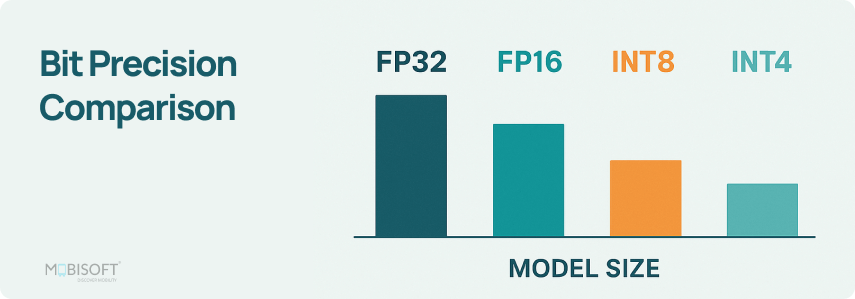
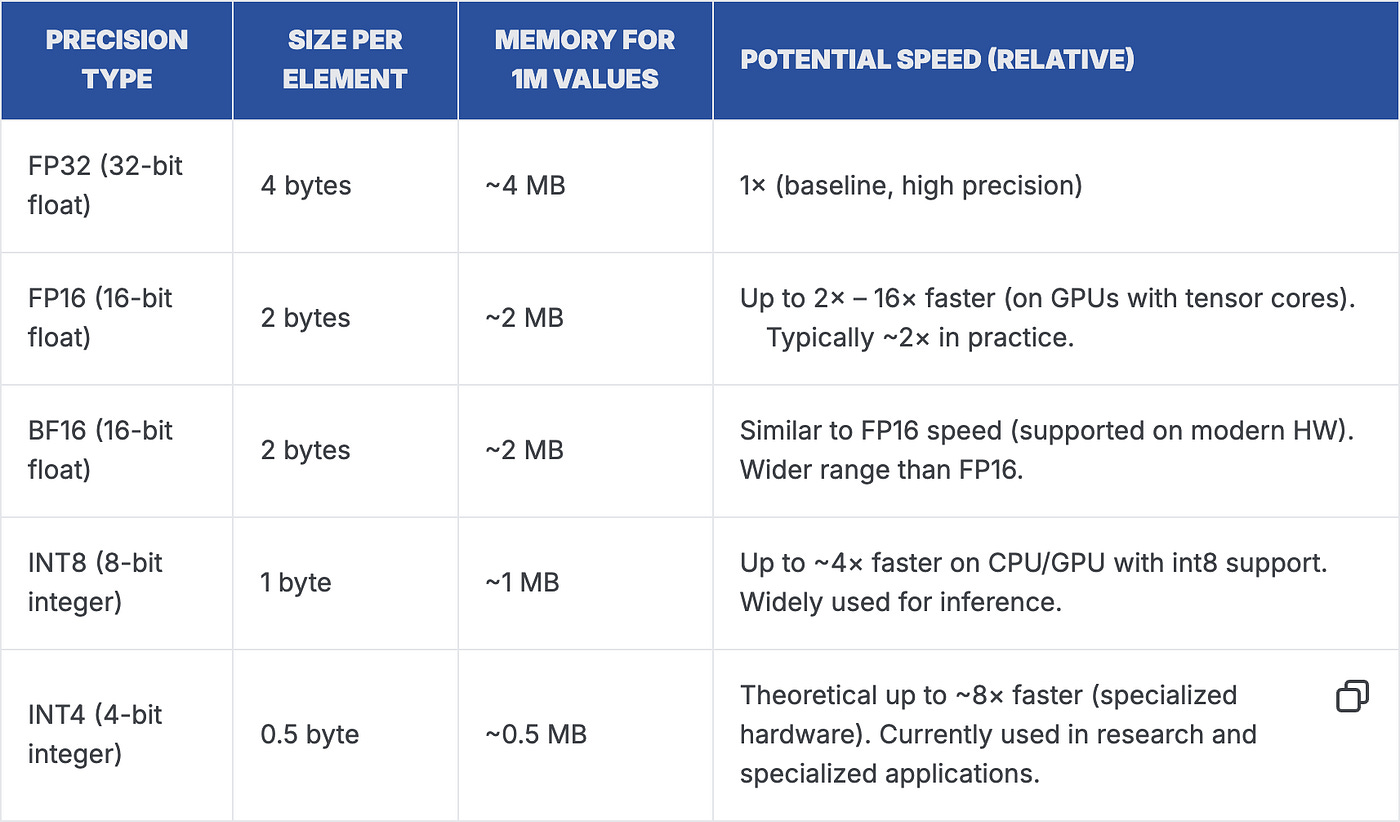
At a high level, quantization maps continuous floating-point values to a smaller set of representable values (the “levels”). INT8 uses 8-bit integers and INT4 uses 4-bit integers, but in practice weights are stored with scales (and sometimes zero-points) so the runtime can reconstruct approximate values during computation.
Modern methods such as NF4 go beyond uniform spacing: they use a non-uniform set of levels designed around common weight statistics (often close to a normal distribution). That’s why NF4 is popular in bitsandbytes / QLoRA workflows, it often preserves quality better than uniform INT4 at similar memory budgets.
How Quantization Methods Evolved
Understanding where each method came from helps you understand why they behave differently in production.
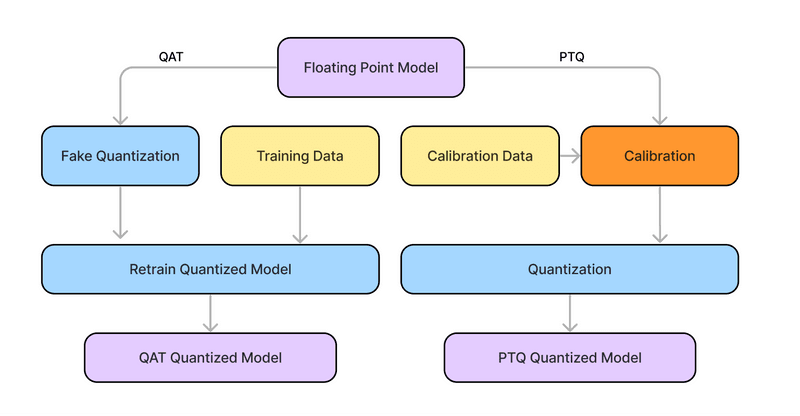
Post-Training Quantization (PTQ)
Simple precision reduction applied after training (no retraining). Fast to implement. Can reduce quality if you push bit-width too low or skip careful calibration.
Quantization-Aware Training (QAT)
Simulates quantization during training so the model adapts to reduced precision. Often more robust than naïve PTQ. But QAT at foundation-model scale is compute-heavy, so it’s less common for large LLM deployments.
Data-Aware / Calibration-Guided Methods
Uses a small representative dataset to choose scales (and sometimes per-group decisions) and minimize quantization error without full retraining. This is where many practical LLM methods like GPTQ and AWQ fit, enabling INT4 (and some INT8) with relatively small quality loss in many real workloads.
The Three Methods Explained
INT8 The Balanced Production Choice
INT8 quantization maps floating-point weights to 8-bit integers. It cuts model size by 50% versus FP16 and maintains strong compatibility with modern hardware acceleration.
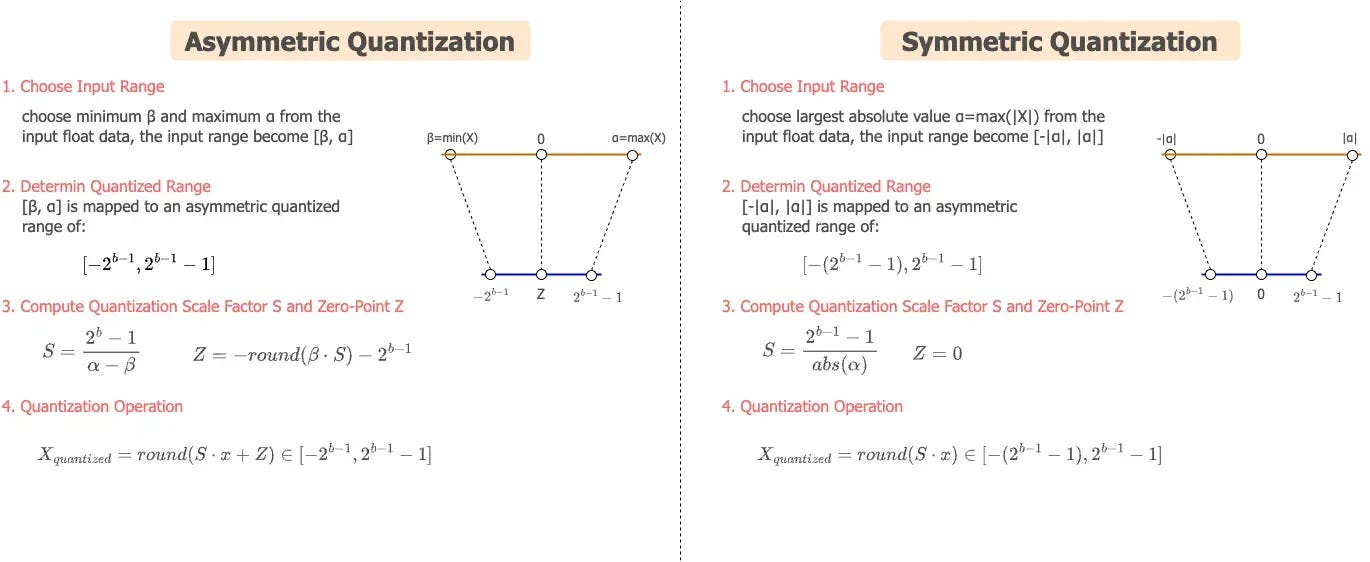
Two mapping schemes matter here:
Symmetric quantization maps the range [−α, α] to [−127, 127] using a single scale factor. Clean and fast.
Asymmetric quantization maps [β, α] to [−128, 127] using both a scale factor and a zero-point. Better for layers with skewed weight distributions.
Hardware support is strong:
● NVIDIA Tensor Cores (V100 and later) accelerate INT8 matrix operations natively
● Intel VNNI extensions provide similar acceleration on CPUs
● This hardware support can improve throughput in the right setup (especially with optimized INT8 kernels and sufficient batching)
INT4 Maximum Compression With Trade-offs
INT4 pushes compression to the limit. You only have 16 codes per group to represent the full continuous distribution of neural network weight. This constraint demands smart boundary selection to preserve critical model information.
Two key techniques make INT4 practical:
AWQ (Activation-aware Weight Quantization): protects the most salient channels/weights (identified using activation statistics) so aggressive 4-bit rounding doesn’t damage the layer’s output too much.
GPTQ (post-training optimization) : chooses quantized values that minimize output error on a small calibration set (often using second-order information), typically producing better quality than naïve rounding at the same bit-width.
The honest trade-off: INT4 has limited native hardware acceleration on most current GPUs. It requires specialized kernels and benefits significantly from mixed-precision deployment strategies.
NF4 — Non-Uniform Precision for Better Accuracy: NF4 (4-bit NormalFloat) is the most sophisticated of the three. Instead of spacing quantization levels uniformly, it designs levels that align with the natural distribution of pre-trained neural network weights, typically approximately normal.
How it works technically: NF4 computes optimal quantization boundaries using the cumulative distribution function (CDF) of target weights. The result is non-uniformly spaced levels that cluster around common weight values. Rare extreme values get less precision. Common central values get more. This matches how information is actually distributed in the model.
Double quantization is an additional efficiency feature. You apply quantization to the scale factors themselves, reducing metadata overhead further. For large models where scale factor storage becomes non-trivial, this matters.
NF4 pairs directly with QLoRA, enabling continued fine-tuning of quantized models. This is a practical advantage INT4 lacks in most standard implementations.
What Actually Consumes Your VRAM
Weight storage is only part of the picture. Total VRAM consumption during inference includes multiple components, and quantization affects each one differently.
Weight quantization does not reduce KV cache memory. For long-context inference, the KV cache can approach or exceed weight memory. This is a separate problem that requires KV cache quantization, which this analysis does not cover.
Latency and Throughput: What the Numbers Actually Mean
Time-to-First-Token (TTFT)
TTFT measures the delay between submitting a request and receiving the first generated token. It directly shapes how responsive your system feels to users.
Quantization affects TTFT through two competing forces:
Reduced memory pressure allows faster initial weight loading and processing. This helps TTFT.
Dequantization overhead adds computation before matrix multiplications can proceed. This hurts TTFT, especially at small batch sizes where the overhead cannot be amortized across multiple requests.
This tension explains why 4-bit methods can show worse TTFT than INT8/FP16 on single requests when dequantization/packing overhead dominates. With optimized kernels (often available in bitsandbytes-style stacks), that overhead can be reduced, and INT4/NF4 can be competitive depending on your runtime.
Where Aggressive Quantization Wins: Batch Throughput
At batch size 16, FP16 runs out of memory on the RTX 4090. INT4 and NF4 continue scaling. This is where aggressive quantization pays off most, not in single-request latency, but in batch throughput at the memory boundary. If you are not measuring batch throughput at your VRAM limit, you are missing the strongest argument for 4-bit quantization.
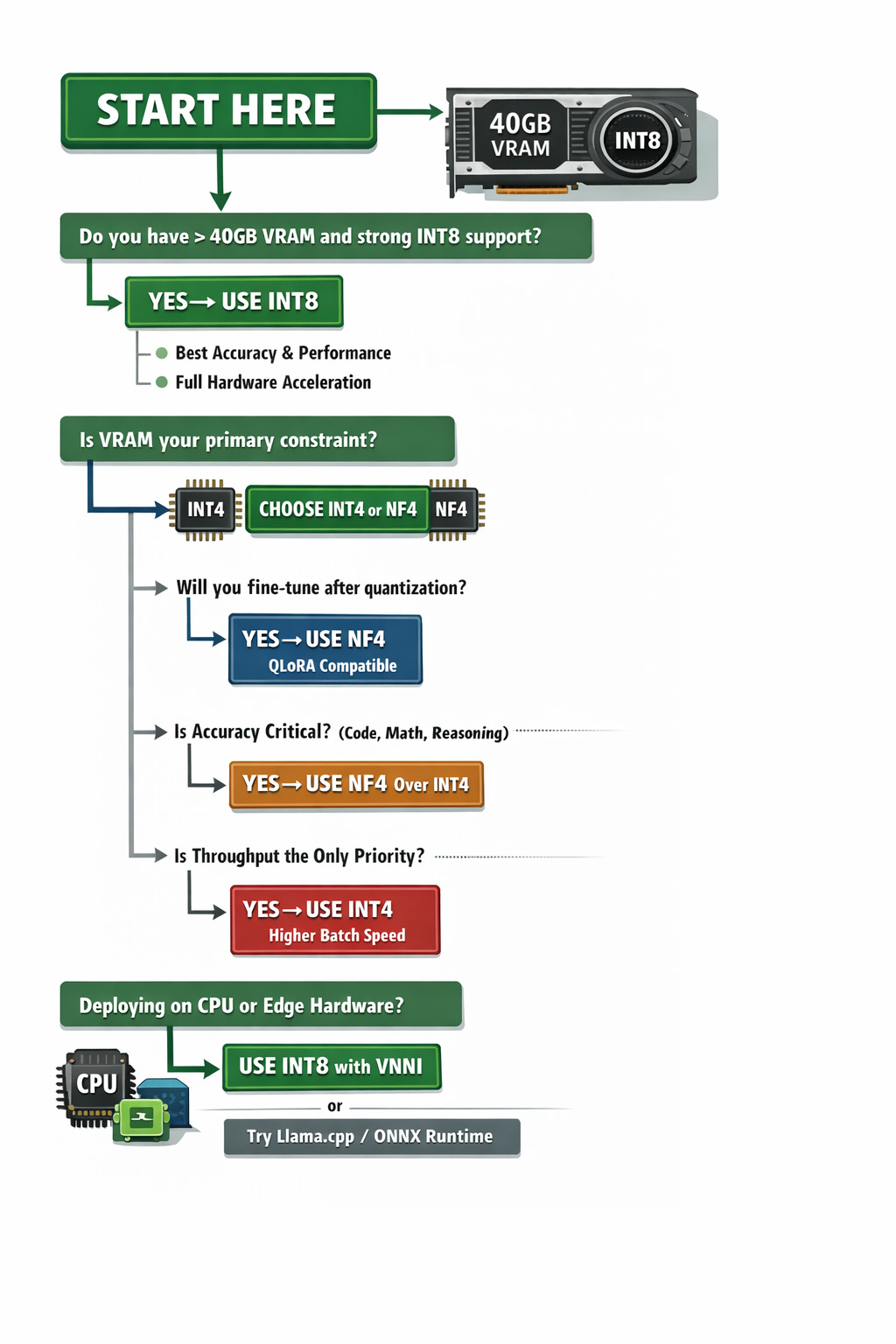
How to Choose the Right Method
Work through this decision framework before committing to a quantization strategy:
Production Deployment Checklist
Before shipping a quantized model to production, work through these steps:
Validation
Benchmark perplexity on WikiText-103 or C4 for your specific model
Run task-specific evaluations, MMLU, HumanEval, GSM8K as appropriate
Test on edge cases and long-context inputs
Verify output quality on domain-specific prompts if applicable
Infrastructure
Confirm your hardware has appropriate acceleration support for the chosen method
Measure actual VRAM usage under peak load, not just model weights
Test batch size scaling to find your throughput sweet spot
Set up TTFT monitoring, it degrades differently than throughput
Operations
Run A/B tests against the FP16 baseline before full rollout
Set up continuous perplexity and latency monitoring
Define rollback criteria and maintain a parallel FP16 deployment path
Document your calibration dataset and quantization parameters for reproducibility
Final Takeaways
Three conclusions stand out from this analysis:
NF4 is often a strong default for 4-bit workflows: It targets the same memory class as INT4 but frequently preserves quality better in bitsandbytes/QLoRA-style setups. Choose plain INT4 when you have a specific kernel/runtime reason (or an established calibration pipeline) that performs better for your workload.
INT8 remains a strong choice when hardware acceleration is available and quality/latency need to be predictable. It typically has fewer compatibility surprises than 4-bit methods and performs well across a wide range of deployments.
The biggest throughput wins from 4-bit quantization usually appear at the memory boundary. If FP16 OOMs at your target batch size or context window, INT4/NF4 can keep scaling, so measure throughput and tail latency at your VRAM limit, not only on a single request.
Start with NF4 if you are memory-constrained. Start with INT8 if you have headroom and need consistency. Measure both on your actual task and hardware before committing.
Did you enjoy this post? Here are some other AI Agents posts you might have missed:
Agents are here and they are staying
How Agents Think
Memory – The Agent’s Brain
Agentic RAG Ecosystem
Multimodal Agents
Scaling Agents: Architectures with Google ADK, A2A, and MCP
Fully Functional Agent Loop
Ready to take it to the next level?
Check out my AI Agents for Enterprise course on Maven and be a part of something bigger and join hundreds of builders to develop enterprise level agents.

Use this link to get $201 OFF!
You’re receiving this email because you’re part of our mailing list—and you’ve attended, registered for, or been invited to our MAVEN events. These emails are the only way to reliably receive updates from us. We don’t spam or sell your information. If you prefer not to receive our messages, simply unsubscribe below and we’ll respect your wishes.